Getting input from the user is the best thing.
For now, we are going to be going over the basics
of getting user input from the console. We are going
to be importing something in Java called "Scanner"
So at the top of project, outside of the class, type import java.util.Scanner;
Alright for the first project we are going to be making
is a calculator.
Alright so set up you main method, and we will begin.
First of all, lets make all of the methods that are
required for math. This means we have to make
the method type an double, doubles
are basically decimals, we want to make it so that any
number can be calculated, wether it is from a whole number to a
decimal.
Addition and Subtraction
Addition is quite simple to do.
You need to inputs num1 and num2. We will then need a return, to
return the sum of the values,
since this method is an int. Our returned number would be the
sum of num1 and mum2.
Our method would look something like this:
This would be the exact same for subtraction except that
instead of num1 + num2 it would be num1 - num2.
That method would look something like this:
Multiplication and Divison
Multiplication and Divison follow the same steps as Addition and Subtraction
except for different symbols in the return part of the method.
The multiplication method would look something like this:
and the division method would look something like this:
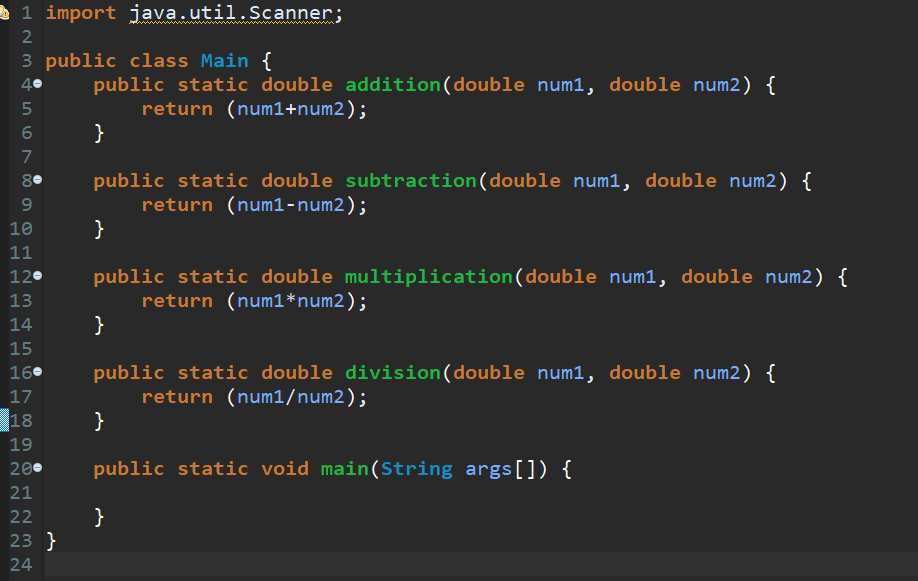
Our class should be looking like this:
We have set up all of our methods, now it is time
to get the input from the user, for this we'll
make another method called "calculate"
This method will contain our question asking,
like if the user wants to add, subtract, multiply, or divide or not,
using the four methods we wrote,
and asking the user if they want to calculate
again. When you have set up the calculate method,
call it in you main method. Make sure that all
methods are static. So that means instead of public void method() {}
it is
public static void method() {}
Okay, lets set up the user input, and then we will
write some if statements to check what the user inputed.
Inside of your calculate method write Scanner input = new Scanner(System.in);
this will basically read the console for the users input.
Alright, lets check what the user wants to do, add, subtract, multiply,
or divide. We can do this by printing to the console "Do you want to add, subtract,
multiply, or divide?"
We will the record the input to a string.
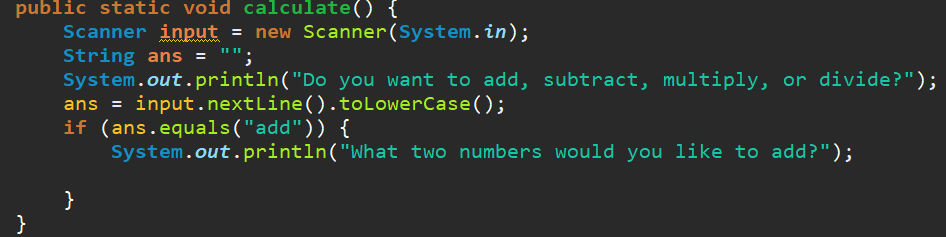
Our calculate method will look something like this:
We will now check what the string is. Since we added .toLowerCase()
to the end of where we record the users answer, which makes it
easier to check through what they answered. So instead of if (ans == "add" || ans == "Add" || etc...) {}
We can simply do if (ans == "add") {}
Let's implement our if statements. First lets make only one if statement,
finish it, and copy and paste it to complete all our categories. However,
in Java, when you're comparing strings, you need to use if (string.equals(string2)) {}
Lets ask the user for what two numbers they want to add subtract, multiply, or divide.
Then lets get those two numbers using input.nextInt();
and converting it to a double using Double.valueOf(string)
Then we will print the answer.
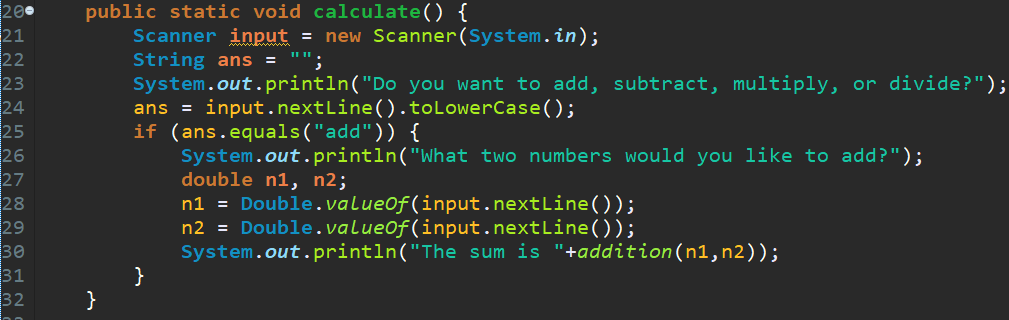
Our calculate method should now look like this:
Lets repeat this three more times. Of course, changing the text, method, and
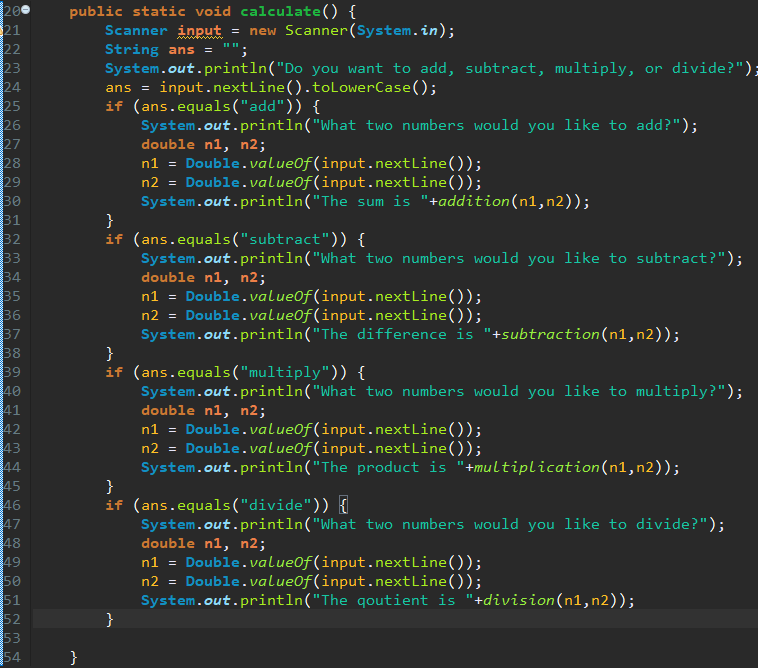
ans in the if statment. Our calculate method should look like this
Finally, let's ask the user if they would like calculate again. At the end
of you calculate method add:
 Getting an input from the console

 and the division method would look something like this: